Navigation
Intro
In this tutorial, we’ll build a Photo Critique and Enhancement App using Google’s Gemini API and Streamlit.
This project started as a personal need — I wanted an AI assistant to help improve my photography.
Whether you’re:
- a beginner photographer
- or exploring AI applications
this project gives you a practical way to learn both.
🎥 Example Inspiration
What You’ll Build
A Photo Critique App that:
- analyzes uploaded images
- provides structured feedback
- suggests improvements
👉 Goal:
Use AI to improve creative skills like photography.
Gemini API Overview
Gemini 1.5 Flash is:
- fast
- efficient
- multimodal
It accepts:
- text
- images
- video
👉 and returns structured feedback
Accessing Google AI Studio
To get started:
- go to Google AI Studio
- sign in with Gmail
- generate API key
Key AI Concepts
Training
- model learns from large datasets
- handled by Google DeepMind
Inference
- model generates output from input
- core part of this app
👉 this is what we use
Fine-Tuning
- improves model for specific tasks
- optional for advanced use
Building the App
We’ll build this in 5 steps.
Step 1: Environment Setup
import os
from dotenv import load_dotenv
import google.generativeai as genai
import streamlit as st
from PIL import Image

load_dotenv()
Step 2: Configure API
API_KEY = os.getenv('API_KEY')

if not API_KEY:
    raise ValueError("No API key found.")

genai.configure(api_key=API_KEY)
model = genai.GenerativeModel("gemini-1.5-flash-8b")
Step 3: Define Functions
def get_gemini_response(input_prompt, image):
    response = model.generate_content(
        [input_prompt, image[0]]
    )
    return response.text

def get_image_content(uploaded_file):
    if uploaded_file is not None:
        image_byte_data = uploaded_file.getvalue()
        image_parts = [{
            "mime_type": uploaded_file.type,
            "data": image_byte_data
        }]
        return image_parts
    else:
        raise FileNotFoundError("File not uploaded")
Step 4: Streamlit Interface
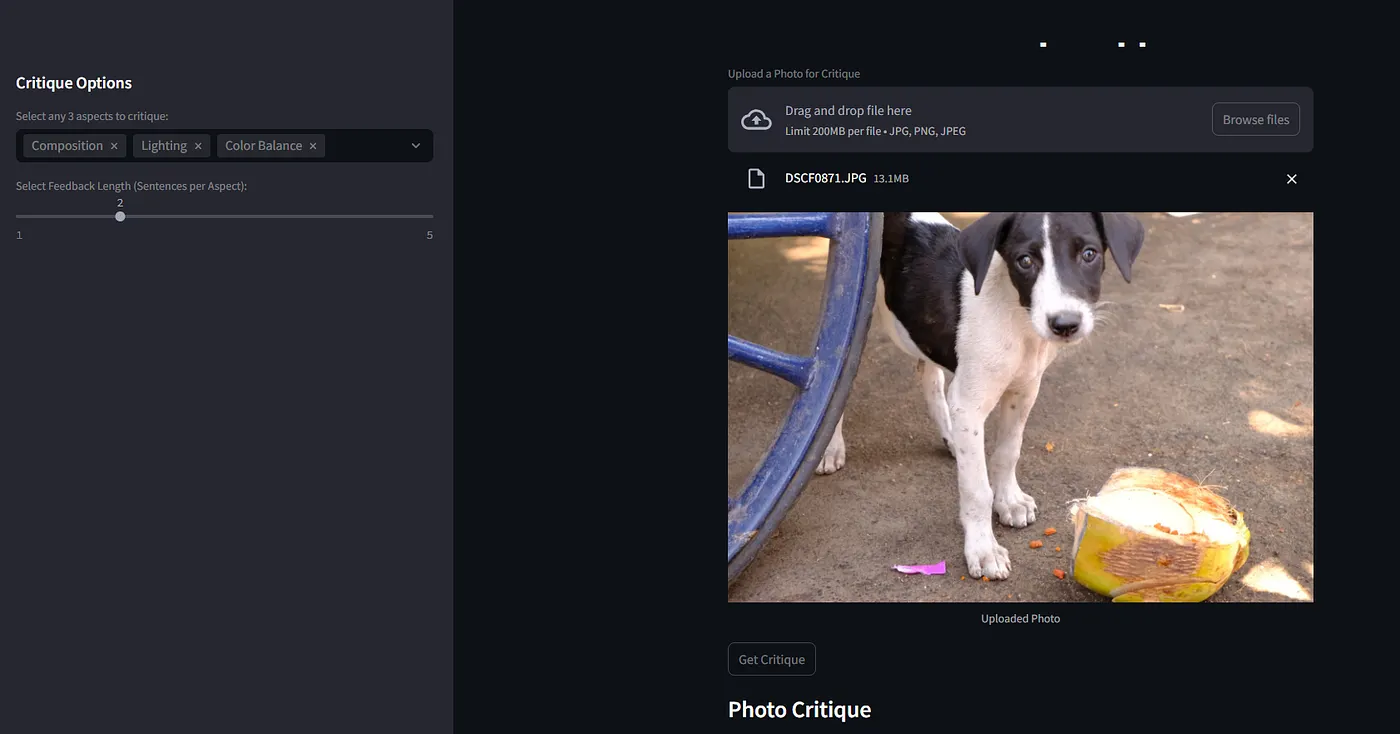
st.set_page_config(page_title="PhotoCritique", layout="centered")

st.markdown("<h1 style='text-align: center;'>PhotoCritique App</h1>", unsafe_allow_html=True)

st.sidebar.header("Critique Options")

aspects = st.sidebar.multiselect(
    "Select any 3 aspects to critique:",
    options=["Composition", "Lighting", "Focus and Sharpness", "Exposure", "Color Balance", "Creativity and Impact"],
    default=["Composition", "Lighting", "Focus and Sharpness"]
)

if len(aspects) != 3:
    st.sidebar.warning("Please select exactly 3 aspects.")

uploaded_file = st.file_uploader("Upload a Photo", type=["jpg","png","jpeg"])

if uploaded_file is not None:
    image = Image.open(uploaded_file)
    st.image(image, caption="Uploaded Photo")

submit = st.button("Get Critique")

if submit and len(aspects) == 3:
    image_data = get_image_content(uploaded_file)

    aspects_list = "\n".join([f"- {a}" for a in aspects])

    input_prompt = f"""
    You are a professional photographer. Critique the image based on:
    {aspects_list}

    Provide:
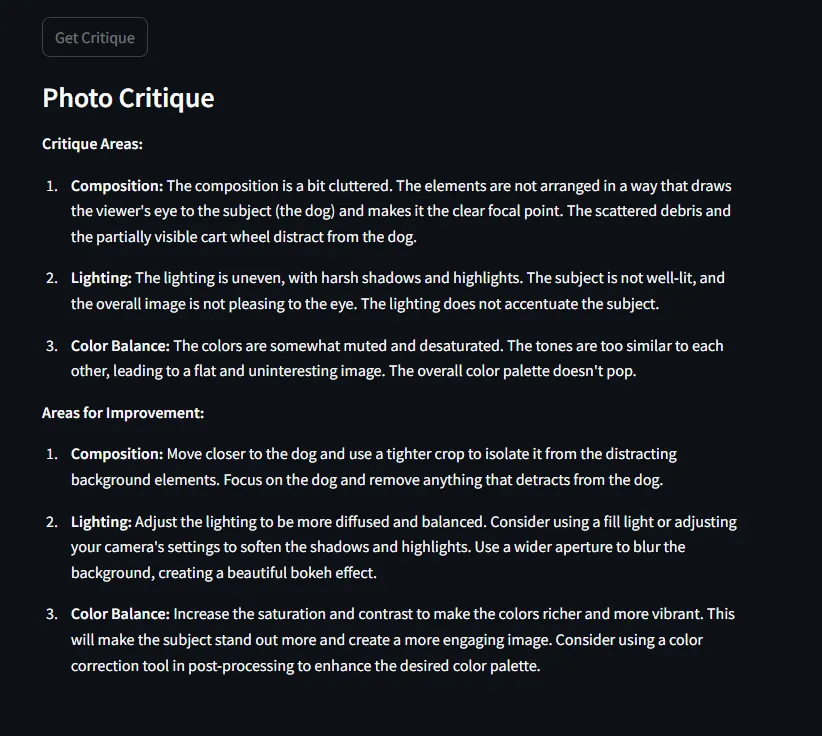
    1. Critique areas
    2. Areas for improvement
    """

    response = get_gemini_response(input_prompt, image_data)

    st.subheader("Photo Critique")
    st.write(response)
📸 App Interface
Run the App
streamlit run app.py
Upload an image → get AI feedback instantly.
📸 Example Output
Conclusion
This app shows how generative AI can:
- enhance creative workflows
- provide actionable feedback
- support learning
Key Insight
AI is not just for automation
it can amplify creativity
📩 Subscribe
If you’re building AI systems:
I share practical workflows, tools, and experiments every time I publish.