Navigation
- Intro
- What You’ll Build
- Understanding RAG
- LangChain Overview
- Step-by-Step Build
- Run the App
- Conclusion
Intro
In this tutorial, we build a Fuji X-S20 Question Answering App using:
- Gemini API
- LangChain
- Gradio
The goal is simple:
👉 Ask questions about your camera without reading a 400-page manual
What You’ll Build
A RAG-powered app that:
- reads a PDF manual
- retrieves relevant context
- answers user questions
Understanding RAG
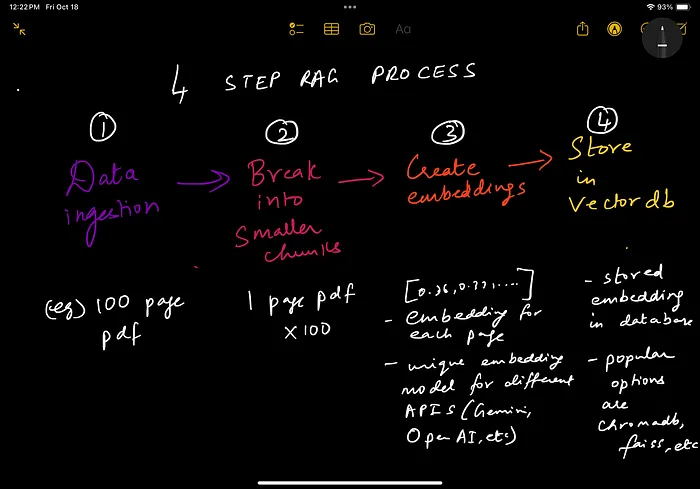
RAG (Retrieval Augmented Generation) works in 4 steps:
- Load data
- Split into chunks
- Create embeddings
- Store in vector database
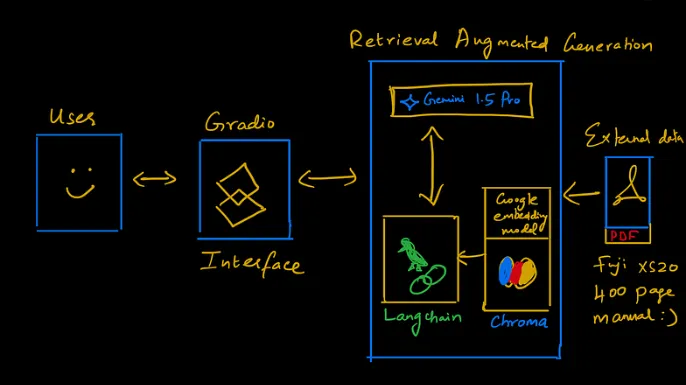
📸 RAG Flow
LangChain Overview
LangChain helps:
- manage embeddings
- connect to vector databases
- build retrieval pipelines
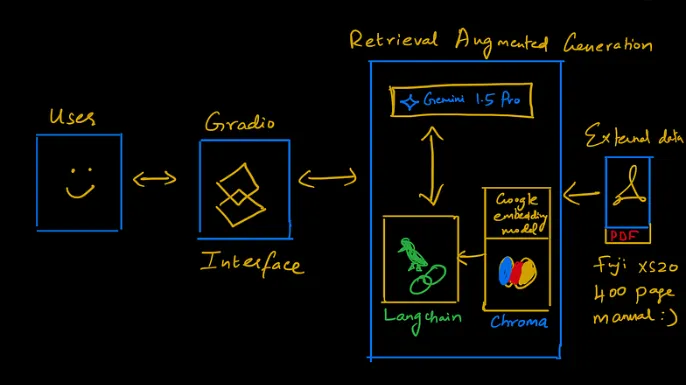
📸 LangChain Flow
Step-by-Step Build
Step 1: Environment Setup
import os
import gradio as gr
from dotenv import load_dotenv
from langchain_community.document_loaders import PyPDFLoader
from langchain.text_splitter import RecursiveCharacterTextSplitter
from langchain_chroma import Chroma
from langchain_google_genai import GoogleGenerativeAIEmbeddings
from langchain_google_genai import ChatGoogleGenerativeAI
from langchain.chains import create_retrieval_chain
from langchain.chains.combine_documents import create_stuff_documents_chain
from langchain_core.prompts import ChatPromptTemplate
Step 2: Load Environment Variables
load_dotenv()
api_key = os.getenv("API_KEY")
Step 3: Load PDF Manual
loader = PyPDFLoader("Fuji_xs20_manual.pdf")
data = loader.load()
Step 4: Split Text
text_splitter = RecursiveCharacterTextSplitter(chunk_size=1000)
docs = text_splitter.split_documents(data)
Step 5: Create Embeddings
embeddings = GoogleGenerativeAIEmbeddings(api_key=api_key, model="models/embedding-001")
vectorstore = Chroma.from_documents(documents=docs, embedding=embeddings)
retriever = vectorstore.as_retriever(search_type="similarity", search_kwargs={"k": 10})
Step 6: Configure LLM
llm = ChatGoogleGenerativeAI(model="gemini-1.5-pro", temperature=0.3, max_tokens=500)
Step 7: Prompt Template
system_prompt = (
    "You are an assistant for question-answering tasks. "
    "Use retrieved context to answer. If unknown, say you don't know. "
    "Keep answers concise."
)

prompt = ChatPromptTemplate.from_messages([
    ("system", system_prompt),
    ("human", "{input}")
])
Step 8: Create RAG Chain
qa_chain = create_stuff_documents_chain(llm, prompt)
rag_chain = create_retrieval_chain(retriever, qa_chain)
Step 9: Query Function
def answer_query(query):
    if query:
        response = rag_chain.invoke({"input": query})
        return response["answer"]
Step 10: Gradio Interface
iface = gr.Interface(
    fn=answer_query,
    inputs="text",
    outputs="text",
    title="Fuji X-S20 Q&A App",
    description="Ask any question about your Fuji camera"
)

if __name__ == "__main__":
    iface.launch()
Run the App
python app.py
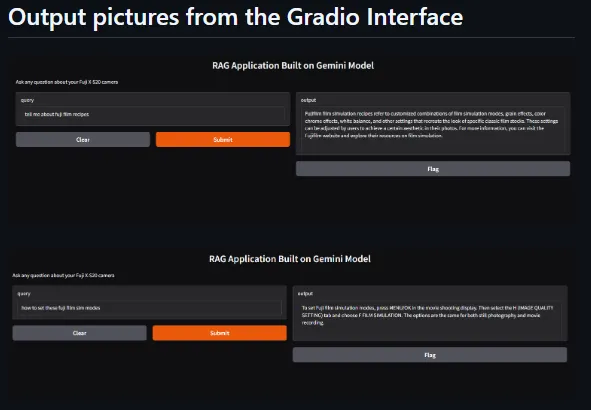
📸 App Interface
Conclusion
You now have a working RAG application that:
- understands documents
- retrieves context
- answers questions
Key Insight
RAG allows AI systems to answer questions using your own data
📩 Subscribe
If you’re building AI systems:
I share practical workflows, tools, and experiments every time I publish.